Note
Go to the end to download the full example code.
2.2 NGBoost (Area)
This file shows how to use ngboost for modeling microbial cell area data.
import shap

import numpy as np

import seaborn as sns

from ngboost import NGBRegressor

import matplotlib.pyplot as plt

from easy_mpl import plot, bar_chart
from easy_mpl.utils import make_clrs_from_cmap

from ai4water import Model
from ai4water.utils import TrainTestSplit
from ai4water.postprocessing import PartialDependencePlot

from utils import plot_stds, version_info, SAVE
from utils import read_data, shap_scatter, ci_from_dist, plot_1d_pdp
from utils import set_rcParams, COLUMN_MAPS_, residual_plot, regression_plot
for lib,ver in version_info().items():
    print(lib, ver)
python 3.9.20 (main, Nov  5 2024, 16:07:55)
[GCC 11.4.0]
os posix
ai4water 1.07
easy_mpl 0.21.4
SeqMetrics 2.0.0
tensorflow 2.10.1
keras.api._v2.keras 2.10.0
numpy 1.21.6
pandas 1.5.3
matplotlib 3.7.1
h5py 3.13.0
sklearn 1.3.1
seaborn 0.13.2
ngboost 0.4.1
shap 0.41.0
set_rcParams()
data = read_data(target='Area (ABD) Mean')

input_features = data.columns.tolist()[0:-1]
output_features = data.columns.tolist()[-1:]

print(input_features)
['Time (min)', 'Ini. CC', 'Sonic. PD', 'h20 Conc.', 'Volume (mL)', 'Solution pH']
print(output_features)
['Area (ABD) Mean']
TrainX, TestX, TrainY, TestY = TrainTestSplit(seed=313).split_by_random(
    data[input_features],
    data[output_features]
)

print(TrainX.shape, TestX.shape, TrainY.shape, TestY.shape)
(219, 6) (95, 6) (219, 1) (95, 1)
Model Building
model = Model(
    model=NGBRegressor(early_stopping_rounds=50),
    mode="regression",
    category="ML",
    input_features=input_features,
    output_features=output_features,
    #wandb_config=dict(project="flowcam", entity="atherabbas", monitor="val_loss")
)
building ML model for
regression problem using NGBRegressor
Model training
rgr = model.fit(
    TrainX, TrainY.values,
    X_val=TestX,
    Y_val=TestY,
)
[iter 0] loss=4.3134 val_loss=4.1396 scale=2.0000 norm=24.6733
[iter 100] loss=3.0922 val_loss=3.1274 scale=2.0000 norm=5.1099
[iter 200] loss=2.3100 val_loss=2.4381 scale=2.0000 norm=3.4496
== Early stopping achieved.
== Best iteration / VAL250 (val_loss=2.3367)
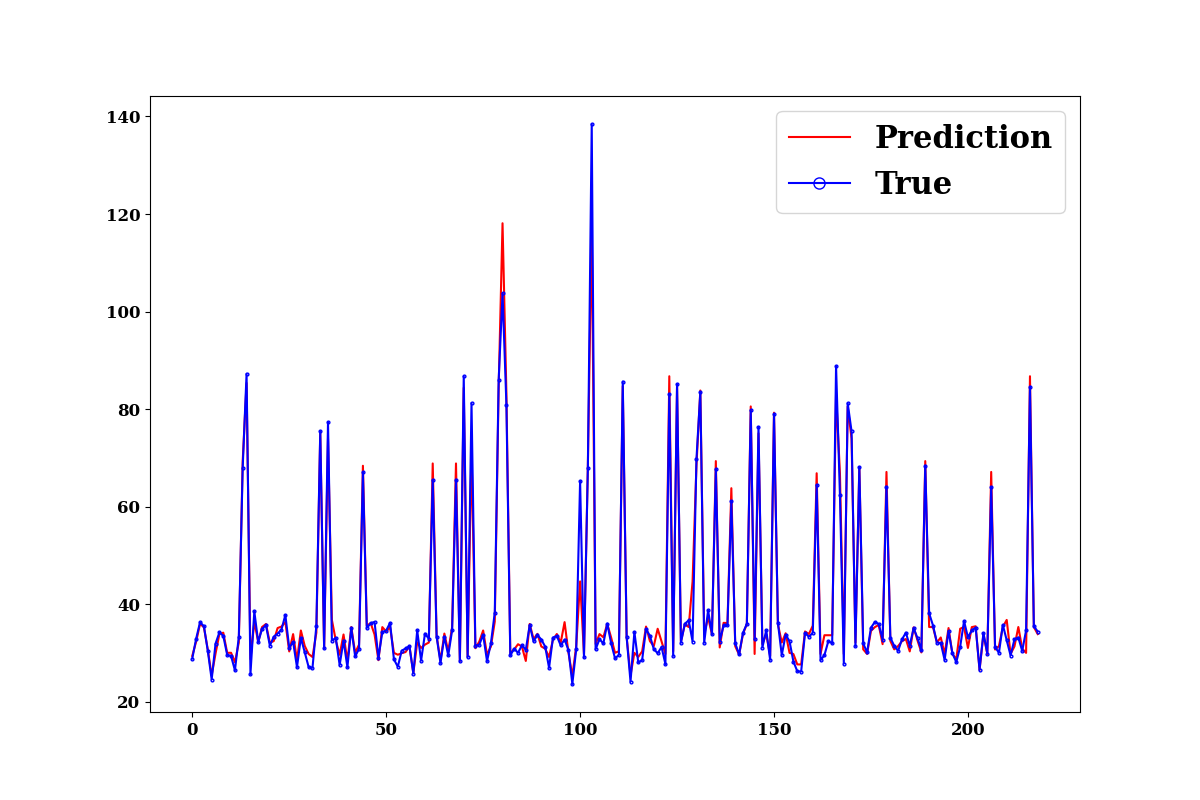
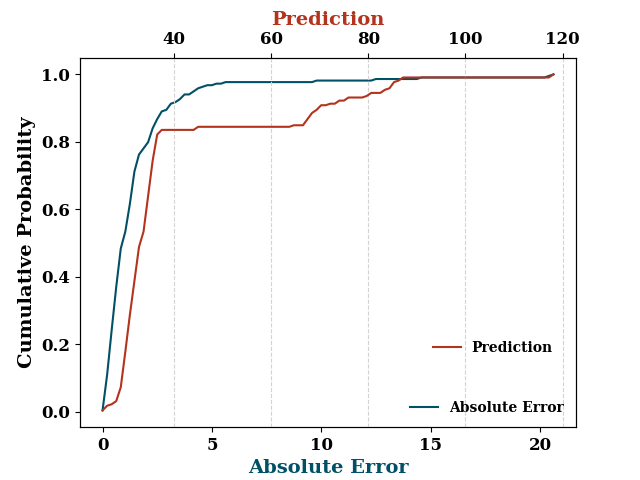
Prediction on training data
train_p = model.predict(
    TrainX.values, TrainY.values,
    log_on_wb=model.use_wb,
    prefix="train",
    plots=["prediction", "edf"],
    #max_iter=rgr.best_val_loss_itr
)
print(model.evaluate(
    TrainX, TrainY.values,
    metrics=["r2", "nse", "rmse", "mae"],
    # max_iter=rgr.best_val_loss_itr # todo why using it is not having any impact
))
{'r2': 0.9738464496169206, 'nse': 0.973570732272537, 'rmse': 2.8966983272991245, 'mae': 1.5128984605585558}
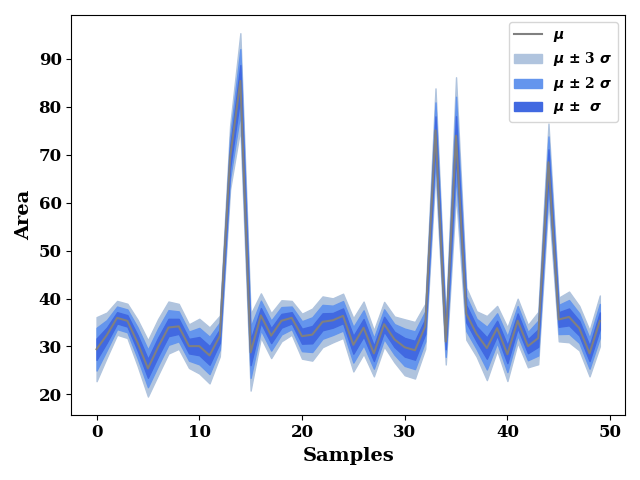
plotting mean prediction and variances (std deviation)
train_dist = rgr.pred_dist(TrainX.iloc[0:50])
train_std = train_dist.dist.std()
train_mean = train_dist.dist.mean()

plot_stds(
        train_mean,
        train_std,
        label="Area"
)
get negative log likelihood
print(-train_dist.logpdf(TrainY).mean())
72.85926706877068
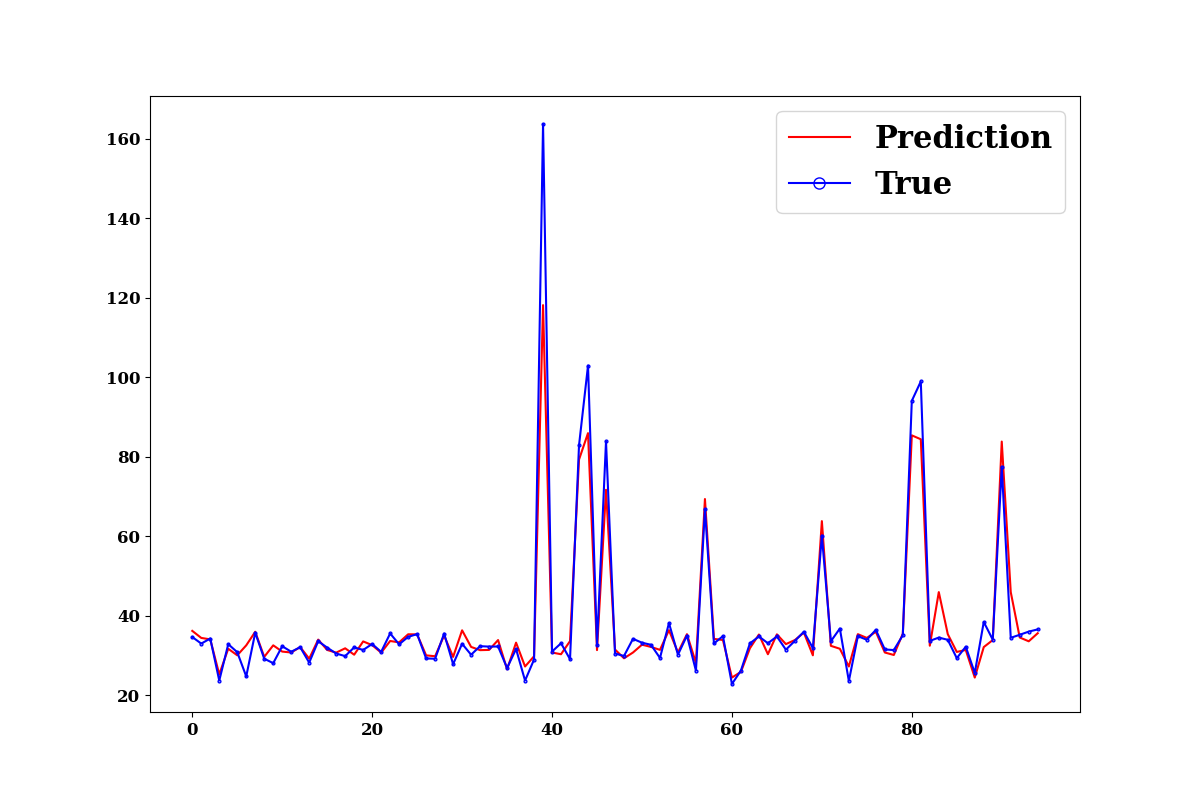
Prediction on test data
test_p = model.predict(
    TestX.values, TestY.values,
    log_on_wb=model.use_wb,
    plots=["prediction", "edf"],
                  #max_iter=rgr.best_val_loss_itr
                  )
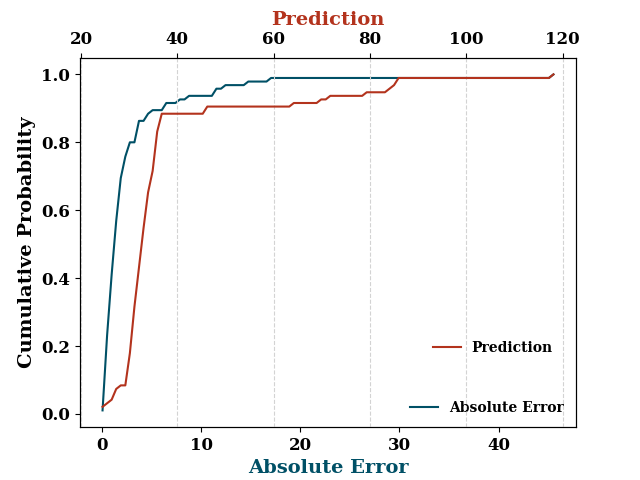
print(model.evaluate(
    TestX, TestY.values,
    metrics=["r2", "nse", "rmse", "mae"],
    # max_iter=rgr.best_val_loss_itr
))
{'r2': 0.9447943624501315, 'nse': 0.9089081863987385, 'rmse': 6.031697562612959, 'mae': 2.667182827533436}
test_dist_50 = rgr.pred_dist(TestX.iloc[0:50])
test_std = test_dist_50.dist.std()
test_mean = test_dist_50.dist.mean()

plot_stds(
        test_mean,
        test_std,
        label="Area"
)
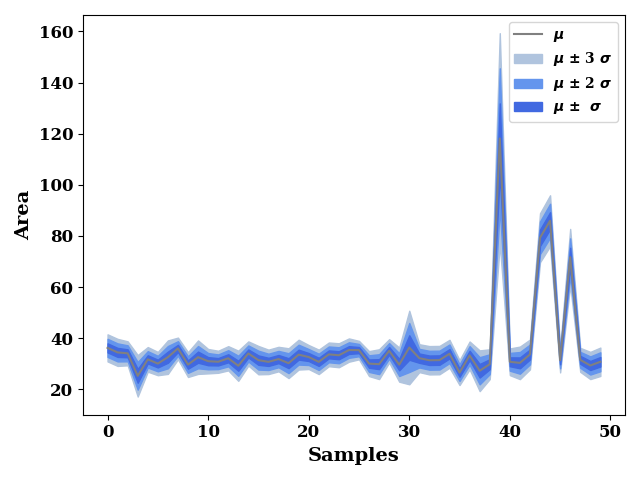
get negative log likelihood
test_dist = rgr.pred_dist(TestX)

print(-test_dist.logpdf(TestY).mean())
76.80971549871242
residual_plot(
    TrainY.values,
    train_p,
    TestY.values,
    test_p,
)
if SAVE:
    plt.savefig("results/figures/residue_ngb_area", dpi=600, bbox_inches="tight")
plt.show()
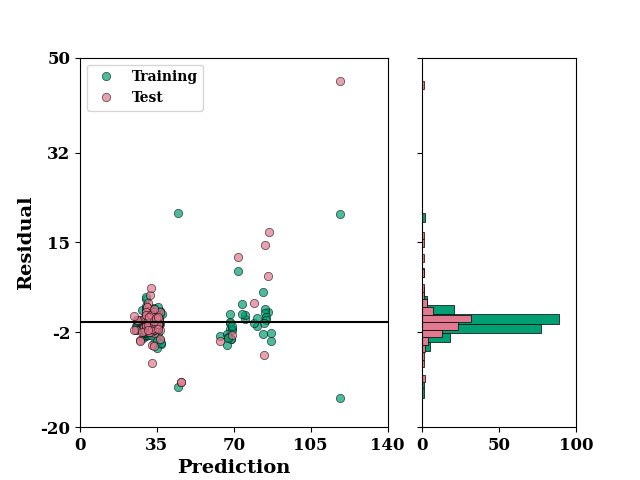
Regression plot of training and test combined
ax = regression_plot(
    TrainY.values, train_p,
    TestY.values, test_p,
    label="Area")
ax.set_xlim([10, 145])
ax.set_ylim([10, 125])
if SAVE:
    plt.savefig("results/figures/reg_ngb_area", dpi=600, bbox_inches="tight")
plt.show()
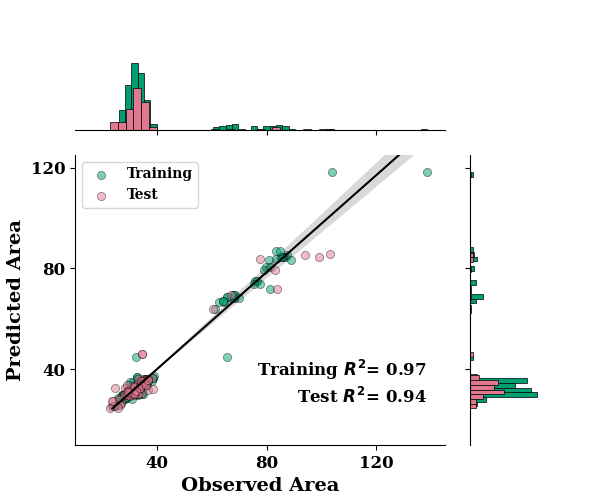
*c* argument looks like a single numeric RGB or RGBA sequence, which should be avoided as value-mapping will have precedence in case its length matches with *x* & *y*. Please use the *color* keyword-argument or provide a 2D array with a single row if you intend to specify the same RGB or RGBA value for all points.
Feature Importance
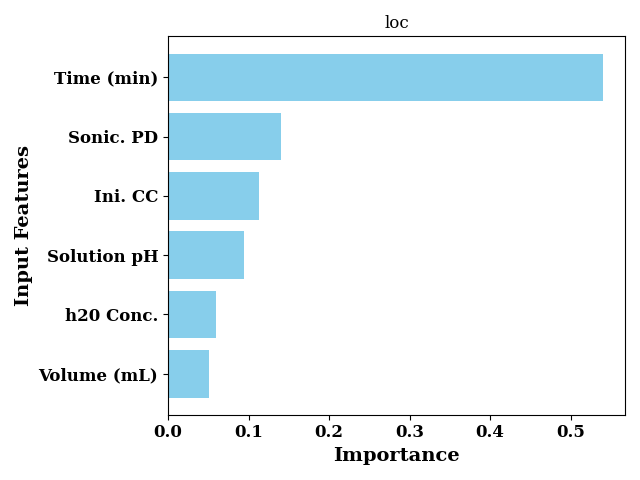
Feature importance for loc trees
feature_importance_loc = rgr.feature_importances_[0]
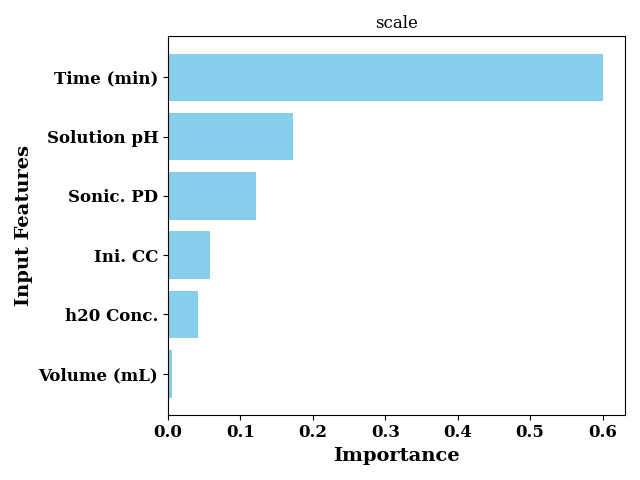
Feature importance for scale trees
feature_importance_scale = rgr.feature_importances_[1]


bar_chart(
    feature_importance_loc,
    labels=input_features,
    color="skyblue",
    sort=True,
    ax_kws=dict(
        title="loc",
        ylabel="Input Features",
        xlabel="Importance",
                ),
    show=False
)
plt.tight_layout()
plt.show()
bar_chart(
    feature_importance_scale,
    labels=input_features,
    color="skyblue",
    sort=True,
    ax_kws=dict(
        title="scale",
        ylabel="Input Features",
        xlabel="Importance",
    ),
    show=False
)

plt.tight_layout()
plt.show()
SHAP
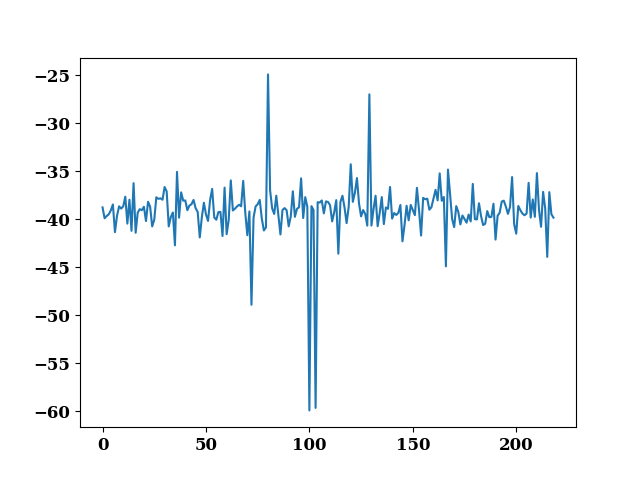
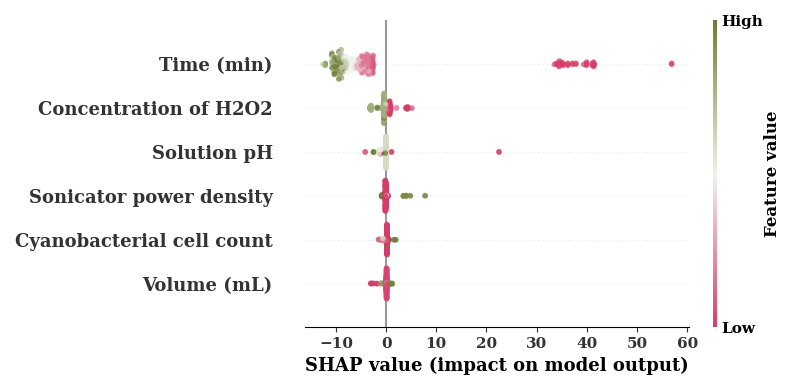
SHAP plot for loc trees
explainer = shap.TreeExplainer(rgr, model_output=0)
shap_values = explainer.shap_values(TrainX.values)

plot(shap_values.sum(axis=1) - TrainY.values.reshape(-1))
<Axes: >
The default cmap is boring so use a different color map
cm = sns.diverging_palette(0,100, as_cmap=True)

feature_names = [COLUMN_MAPS_.get(fname, fname) for fname in input_features]
shap.summary_plot(shap_values,
                  TrainX.values,
                  feature_names=feature_names,
                  cmap=cm,
                  alpha=0.7,
                  show=False
                  )
if SAVE:
    plt.savefig(f"results/figures/ngb_shap_loc_area.png", dpi=600, bbox_inches="tight")
plt.tight_layout()
plt.show()
No data for colormapping provided via 'c'. Parameters 'vmin', 'vmax' will be ignored
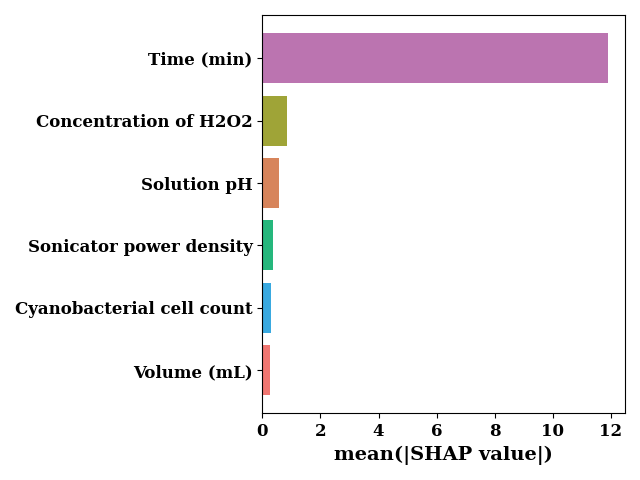
sv_bar = np.mean(np.abs(shap_values), axis=0)

bar_chart(
    sv_bar,
    feature_names,
    orient="horizontal",
    color=["#bb74b0", "#39a9e0", "#25b77c", "#9fa437", "#f07671", "#d7845b"],
    sort=True,
    show=False,
    ax_kws=dict(xlabel="mean(|SHAP value|)")
)
if SAVE:
    plt.savefig(f"results/figures/ngb_shap_loc_bar_area.png", dpi=600, bbox_inches="tight")
plt.tight_layout()
plt.show()
SHAP plot for scale trees
explainer = shap.TreeExplainer(rgr, model_output=1)
shap_values = explainer.shap_values(TrainX.values)

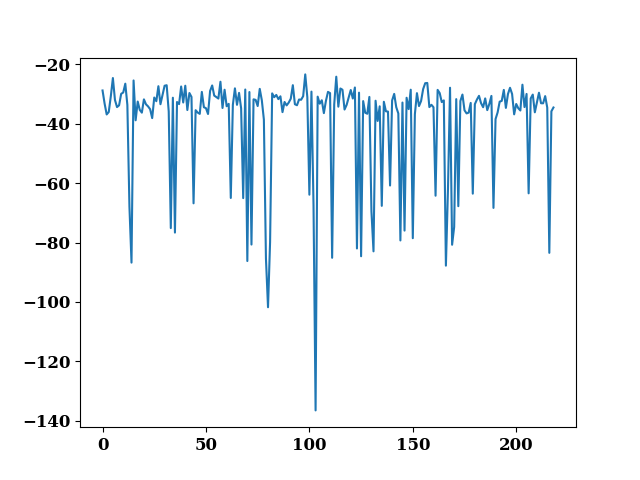
plot(shap_values.sum(axis=1) - TrainY.values.reshape(-1))
<Axes: >
feature_names = [COLUMN_MAPS_.get(fname, fname) for fname in input_features]
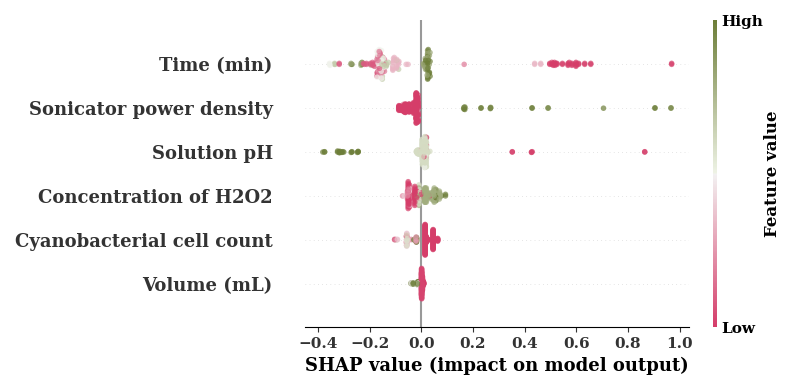
shap.summary_plot(shap_values,
                  TrainX.values,
                  feature_names=feature_names,
                  cmap=cm,
                  alpha=0.7,
                  show=False
                  )
if SAVE:
    plt.savefig(f"results/figures/ngb_shap_scale_area.png", dpi=600, bbox_inches="tight")
plt.tight_layout()
plt.show()
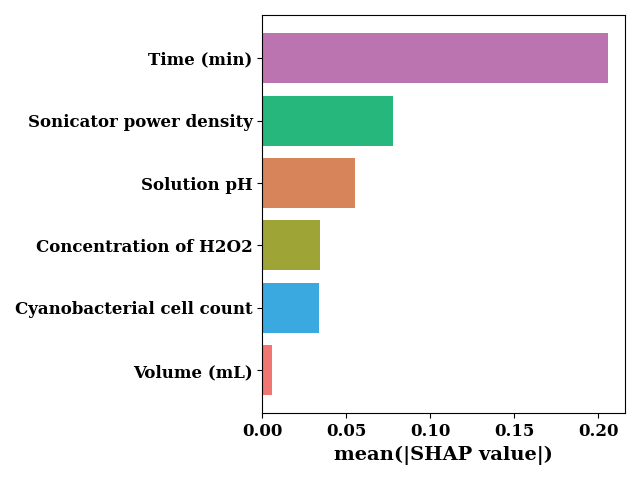
sv_bar = np.mean(np.abs(shap_values), axis=0)

bar_chart(
    sv_bar,
    feature_names,
    orient="horizontal",
    color=["#bb74b0", "#39a9e0", "#25b77c", "#9fa437", "#f07671", "#d7845b"],
    sort=True,
    show=False,
    ax_kws=dict(xlabel="mean(|SHAP value|)")
)
if SAVE:
    plt.savefig(f"results/figures/ngb_shap_scale_bar_area.png", dpi=600, bbox_inches="tight")
plt.tight_layout()
plt.show()
feature_name = 'Time (min)'
shap_scatter(
    shap_values[:, 0],
    TrainX.loc[:, feature_name],
    color_feature=TrainX.loc[:, 'Ini. CC'],
    feature_name=feature_name
)
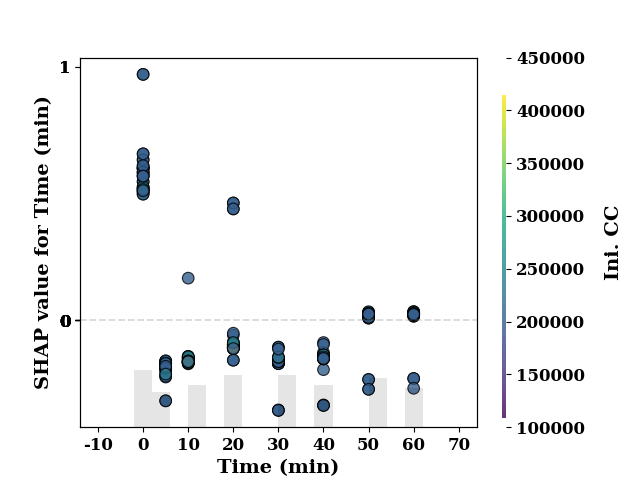
<Axes: xlabel='Time (min)', ylabel='SHAP value for Time (min)'>
feature_name = 'Time (min)'
shap_scatter(
    shap_values[:, 0],
    TrainX.loc[:, feature_name],
    color_feature=TrainX.loc[:, 'Sonic. PD'],
    feature_name=feature_name
)
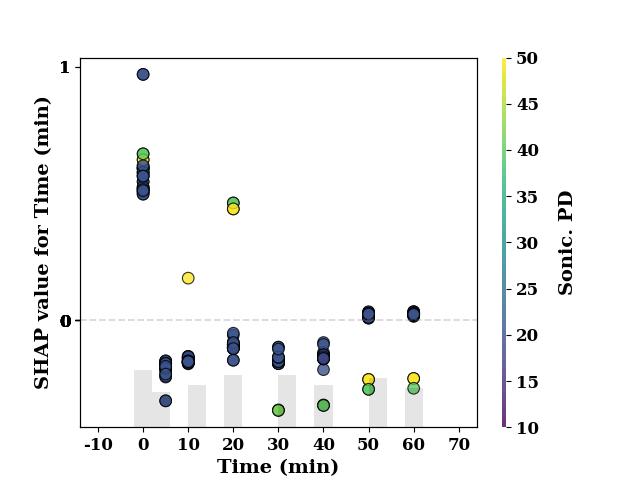
<Axes: xlabel='Time (min)', ylabel='SHAP value for Time (min)'>
feature_name = 'Time (min)'
shap_scatter(
    shap_values[:, 0],
    TrainX.loc[:, feature_name],
    color_feature=TrainX.loc[:, 'h20 Conc.'],
    feature_name=feature_name
)
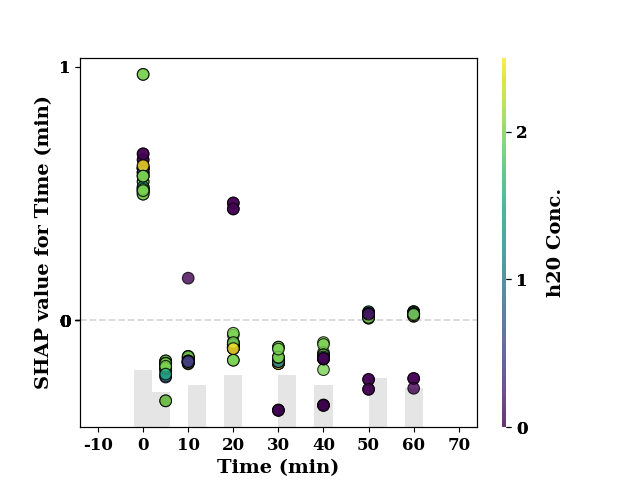
<Axes: xlabel='Time (min)', ylabel='SHAP value for Time (min)'>
feature_name = 'Time (min)'
shap_scatter(
    shap_values[:, 0],
    TrainX.loc[:, feature_name],
    color_feature=TrainX.loc[:, 'Volume (mL)'],
    feature_name=feature_name
)
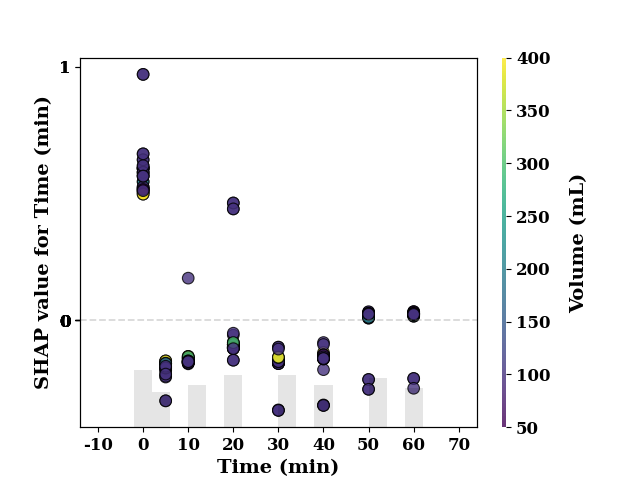
<Axes: xlabel='Time (min)', ylabel='SHAP value for Time (min)'>
feature_name = 'Time (min)'
shap_scatter(
    shap_values[:, 0],
    TrainX.loc[:, feature_name],
    color_feature=TrainX.loc[:, 'Solution pH'],
    feature_name=feature_name
)
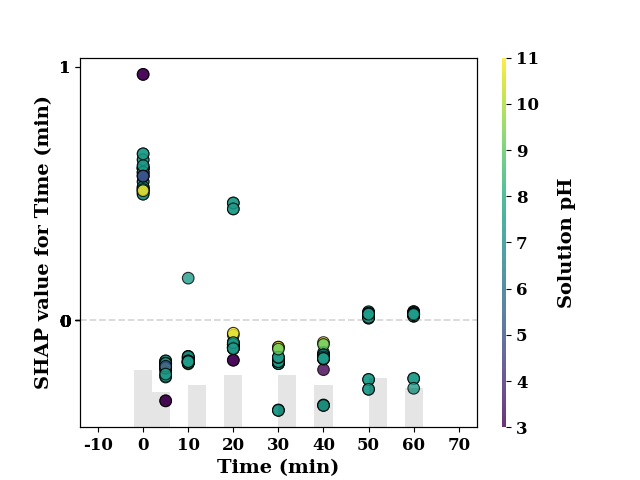
<Axes: xlabel='Time (min)', ylabel='SHAP value for Time (min)'>
Partial Dependence Plot
pdp = PartialDependencePlot(
    model.predict,
    TrainX,
    num_points=20,
    feature_names=TrainX.columns.tolist(),
    show=False,
    save=False
)
plot_1d_pdp(pdp, TrainX.values, 'Time (min)')
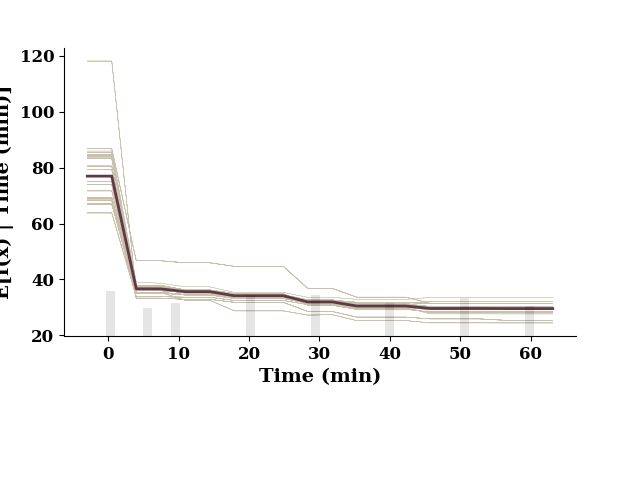
This figure includes Axes that are not compatible with tight_layout, so results might be incorrect.
plot_1d_pdp(pdp, TrainX.values, 'Ini. CC')
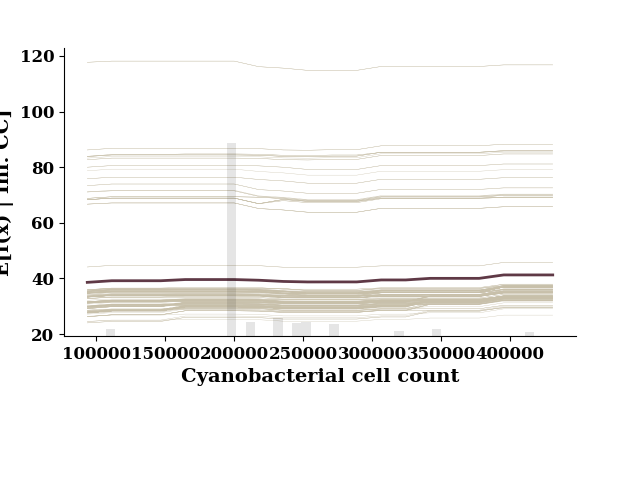
This figure includes Axes that are not compatible with tight_layout, so results might be incorrect.
plot_1d_pdp(pdp, TrainX.values, 'Sonic. PD')
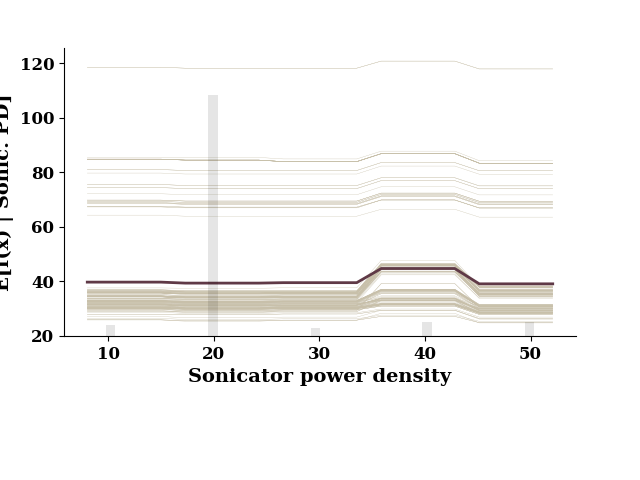
This figure includes Axes that are not compatible with tight_layout, so results might be incorrect.
plot_1d_pdp(pdp, TrainX.values, 'h20 Conc.')
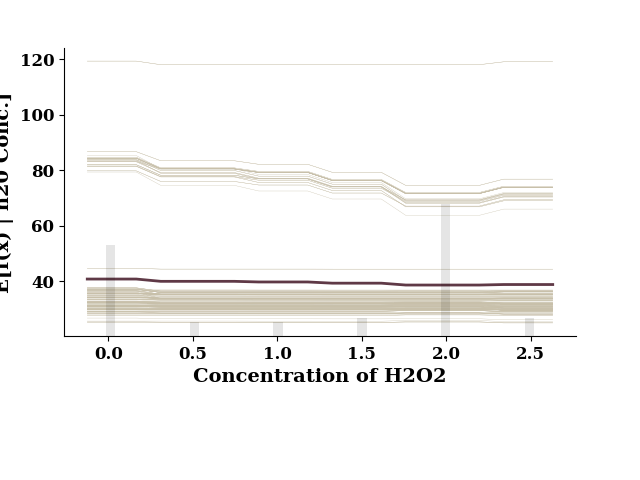
This figure includes Axes that are not compatible with tight_layout, so results might be incorrect.
plot_1d_pdp(pdp, TrainX.values, 'Volume (mL)')
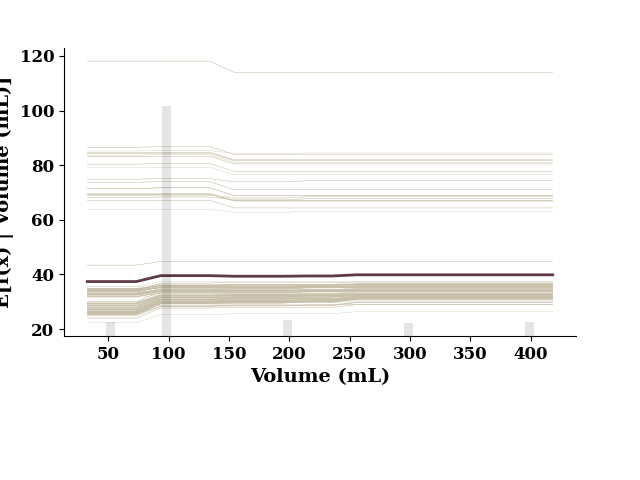
This figure includes Axes that are not compatible with tight_layout, so results might be incorrect.
plot_1d_pdp(pdp, TrainX.values, 'Solution pH')
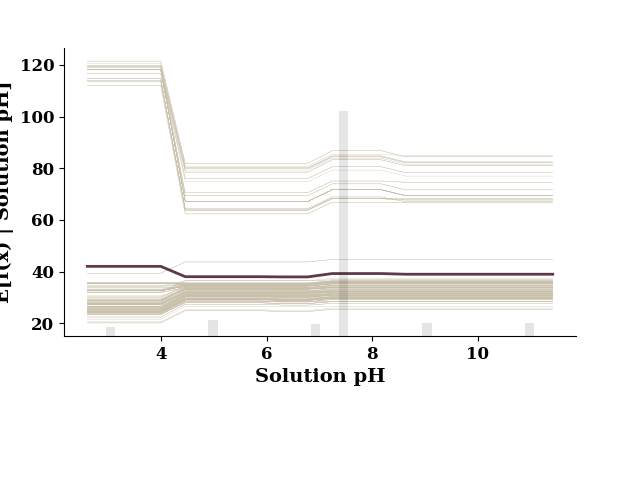
This figure includes Axes that are not compatible with tight_layout, so results might be incorrect.
if model.use_wb:
    model.wb_finish()
Plot probability distribution for individual samples.
clrs = make_clrs_from_cmap(cm="tab20", num_cols=10)

y_pred_all = rgr.predict(data[input_features])
Y_dists = rgr.pred_dist(data[input_features])
y_range = np.linspace(data[output_features].min().item(),
                      data[output_features].max().item(), len(data))
dist_values = Y_dists.pdf(y_range.reshape(-1,1)).transpose()# plot index 0 and 114
indices = [28, 35, 45, 54, 90, 100, 150, 200, 250, 300]
fig, all_axes = plt.subplots(10, 1, sharex="all", figsize=(6, 8))

idx1 = 0
for idx, ax in zip(indices, all_axes.flat):
    ax = plot(y_range, dist_values[idx],
              color=clrs[idx1],
              ax=ax, show=False)
    ax.axvline(y_pred_all[idx], color="darkgray")
    ax.text(x=0.5, y=0.7, s=f"Sample ID: {idx}",
            transform=ax.transAxes,
            fontsize=12, weight="bold")

    ax.set_yticks([])

    idx1 += 1

xticks = np.array(ax.get_xticks()).astype(int)
ax.set_xticklabels(xticks, weight="bold", fontsize=12)
ax.set_xlabel("Area (mean)", fontsize=14, weight="bold")
if SAVE:
    plt.savefig("results/figures/local_pdfs_area", dpi=600, bbox_inches="tight")
plt.show()
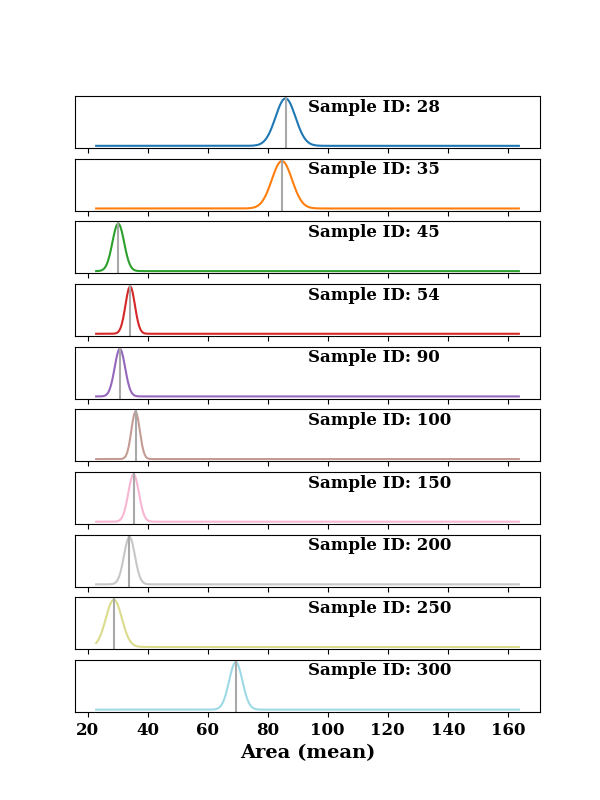
FixedFormatter should only be used together with FixedLocator
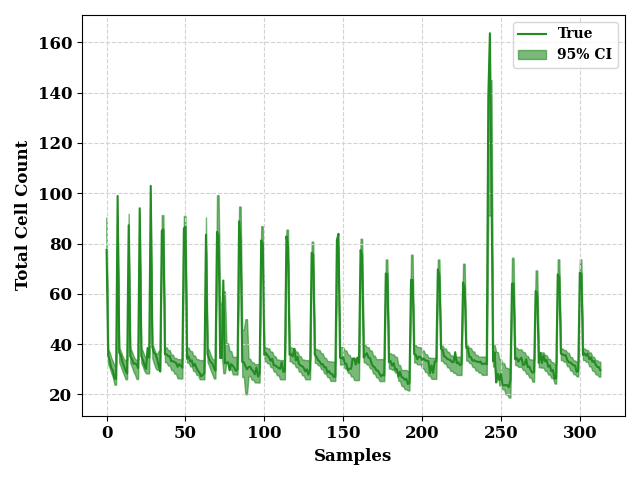
ci_from_dist(
    Y_dists,
    0.95,
    data[output_features].values,
    "Cell Count",
    fill_color = "forestgreen",
    line_color = "forestgreen"
)
if SAVE:
    plt.savefig("results/figures/ci_95_ngb_area", dpi=600, bbox_inches="tight")
plt.tight_layout()
plt.show()
FixedFormatter should only be used together with FixedLocator
FixedFormatter should only be used together with FixedLocator
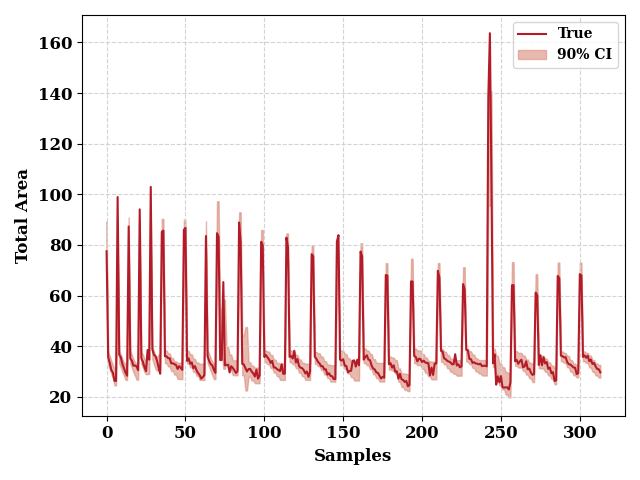
ci_from_dist(
    Y_dists,
    0.9,
    data[output_features].values,
    "Area",
    fill_color = np.array([217, 140, 122])/255,
    line_color = np.array([180, 27, 40])/255
)
if SAVE:
    plt.savefig("results/figures/ci_90_ngb_area", dpi=600, bbox_inches="tight")
plt.tight_layout()
plt.show()
FixedFormatter should only be used together with FixedLocator
FixedFormatter should only be used together with FixedLocator
Total running time of the script: (0 minutes 14.944 seconds)